Ludum Dare 37 Game Entry

This past weekend, I got the chance to participate in the Ludum Dare game jam. If you are not familiar with Ludum Dare it is a game jam that has been around for over 12 years.

This time around the theme was “One Room”, so my teammates and I came up with the idea that you would play as a room in a house, and you would need to fight the rest of rooms to be the best room in the house. The game was going to be a 2D “fighting” game, but with the combat being very basic.

The game itself was made in Unity, all the audio was original, and most of the art was original this time. If you are interested in seeing our finished project, you can see it here:  http://scottwestover.github.io/games/RoomWars/

You can also view the game on Ludum Dare here:  http://ludumdare.com/compo/ludum-dare-37/?action=preview&uid=113176

Unity Live Training Session On November 14th (Creating A Quiz Game: Session 1)

Unity will be holding another live training session on November 14th, at 3:00 - 4:00 PM EST. For this live session they will be going over how to make a multiple choice quiz game. During this session, they will be going over the core game loop, the code architecture best practices, and how to make the code easy to maintain and extend.

This session will be hosted by Matthew-Schell. If you are interested in learning more or in signing up, you can do so here:  https://unity3d.com/learn/live-training/session/creating-quiz-game-session-1

How To Connect To The Engagement History API Through Postman

I have gotten a lot of request from people on how to connect to the APIs that are available from LivePerson using Postman, so I decided to share how to do this here.

In order to follow along with this tutorial, you will need the API keys that are available for Engagement History API, and you will need access to the Postman App. To get these keys, you can log into the LiveEngage console, and grab them from them from the API tab under data sources, which is on the campaigns tab. If you are not sure on how to setup your keys, you can learn how to do so here.

If you do not already have Postman installed, you can learn more about it and install it from here:  https://www.getpostman.com/

If you would just like to import a template of the query into Postman, you can do so here:  https://www.getpostman.com/collections/6bd9d4cc64bbee6843f1

Let’s get started.

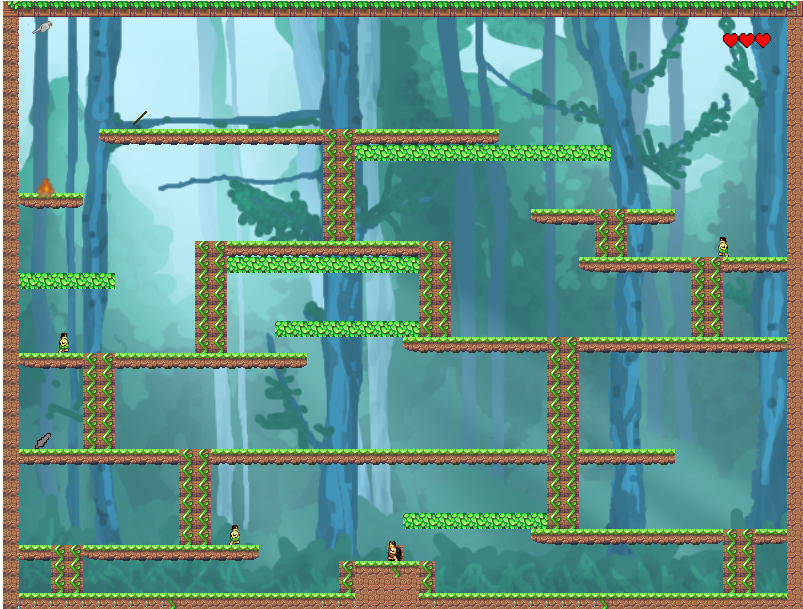
Ludum Dare 36 Game Entry

Last weekend a few friends from work and I decided to enter Ludum Dare. Ludum Dare is one of the longest running game jams that happens every April, August, and December. It has been around for 12 years, and we finally decided to enter this time around.


It was a really interesting experience, since you have a strict deadline to make a game, and you do not receive the theme of the game jam until the jam starts. The theme this time around was ancient technology, so we decided to try and make a 2D platformer that was similar to the old load runner games.

You play as a caveman, and your objective is to try and steal the other caveman's fire and get it back to your cave. You must dodge the other cavemen, until you are able to make a spear which will allow you to attack them. In the end, the game was only 2 levels long.

The game itself was made in Phaser, all audio in the game was original, and most of the art was obtained from opengameart.org. If you are interested in seeing our finished project, you can see it here: http://ludumdare.com/compo/ludum-dare-36/?action=preview&uid=113176

Overall, it was a lot of fun, and it was nice to see this project through to completion. If you are interested in checking out the source code, you can find that on GitHub here: https://github.com/scottwestover/Ludum-Dare-36


If you have an interest in game development, and if you have not had the chance to enter into a game jam, I would recommend that you do. It can be quite daunting at first, but it is really rewarding when at the end of the jam, you have something to show. It is a great learning experience since it allows for you to get feedback on your work, and you can see how other people made their games.

I hope you enjoyed this post. If you have any questions or comments, please feel free to post them below.

Querying The Engagement History API With Firefox RESTClient

The Engagement History API is an API that is available from LivePerson, and it allows for you to search, filter, and keep copies of chat transcripts and the related data, such as visitor information, agent information, and much more.

Before writing any code to start querying the API, it can be useful to use a tool that will allow for you to connect to the API in seconds.

Troubleshooting APIs With A RESTClient

When it comes time to connect to APIs, I find that it is a lot easier to test them using a REST client before you start writing any code. Using a REST client allows for you to make sure that you are able to connect to it successfully, and it allows for you to try out different parameters of the API.

One of the best tools that I was introduced to is, the Firefox RESTClient Plugin. This plugin is very easy to use, and it allows for you to save your request for quick reference.

Update For March

Hi Everyone,

I know it has been awhile since my last post here, so I just wanted to give everyone a quick update. I haven’t had a lot of time to create content rich posts since I have had a few life changes in the past 2 months. I ended up fracturing my ankle mid February, so my daily routine has changed quite a bit, and I had been asked to create blog posts for the new support community at LivePerson, so I have been focusing on creating content there.

I plan to start sharing those post here, and to start making new content for this blog shortly. In the mean time, I appreciate all of the readers that have still been dropping by.

In case you are interested, here is a link to the Experts Blog on the new support community at LivePerson:  https://connect.liveperson.com/blogs/expert-blog

If you have any comments, please share them below.

LiveEngage - Engagement History API Program To Send Email

Today I wanted to share with you a program I made that will allow you to use the Engagement History API to send out emails for transcripts that have a particular keyword.

The program will use the API to pull all of your chat transcripts for the previous day that contain a certain keyword, and then it will send it to an email address that you specify. The program makes use of the SendGrid API in order to send the emails.

One example use case for this tool is if you wanted to get an email every time someone answered dissatisfied on your post chat survey, you could use that keyword and it will automatically pull those transcripts.

In order to use the program, you will need to have a SendGrid account with an API key enabled on it. SendGrid allows for you to send up to 12,000 emails for free a month, and if you need to send more they offer very cheap plans. You will also need to have the Engagement History API enabled on your LiveEngage account in order to use the program.

LiveEngage - Use Your Own Custom Chat Button By Using JQuery

Update: With the new HTML engagements in LiveEngage, this method is now outdated. It is recommended that you use the supported method listed above.

The purpose of this tutorial is to show you how you can use your own chat buttons with LiveEngage by using JavaScript.

Currently in LiveEngage, you have a limited number of options for creating a chat button in the LiveEngage studio. This can make it hard for the chat button to match the look of your site, especially with all of the things you can do with CSS and JavaScript today.

So, in order to work around this,you will need to create your own chat that you would like to use on your website, and you will need to create a basic embedded chat button in the LiveEngage studio. Don’t worry about what the embedded chat button looks like because we are going to use CSS styling to hide the chat button, and then use JavaScript to click the LiveEngage chat button when your button is clicked.